

Did you know that 76.3% of physical mail items are read or glanced at upon arrival? In a world saturated with digital noise, a physical leaflet remains a powerful tool to capture immediate attention. However, knowing how to print a leaflet that actually drives results requires more than just a good design; it demands technical precision. You’ve likely felt the stress of a looming corporate deadline while worrying if your images will appear pixelated or if your bleed and crop marks are set correctly. We agree that there’s no room for error when your brand’s reputation is on the line.
This guide promises to help you master every step of the production process, from initial file setup to choosing eco-conscious stocks. You’ll learn how to create high-resolution PDFs that ensure your graphics stay sharp and professional. We’ll walk you through essential pre-flight file checks, explain the truth behind the 300 DPI myth, and help you select custom finishing options that make your marketing materials stand out. Whether you need a fast turnaround in London or specific custom dimensions, these steps will ensure your print-ready files deliver high-impact results every time.
Key Takeaways
- Identify your marketing objective to select the most effective ISO 216 dimensions, such as A5 or DL, for your specific distribution strategy.
- Master the technical steps of how to print a leaflet by setting your document to CMYK colour mode and including a 3mm bleed to ensure a professional finish.
- Choose between various paper weights and custom finishing options, including silk or high-gloss, to match your brand aesthetic and durability requirements.
- Conduct pre-flight file checks to verify image resolution and font embedding, preventing costly errors before moving to high-speed digital production.
- Secure a reliable partner for urgent deadlines by accessing 24/7 printing services in Central London that offer same-day delivery to your event or stand.
Defining Your Leaflet Strategy for Maximum Engagement
Success in physical marketing begins with a defined objective. Whether you’re targeting direct sales, event promotion, or brand awareness, your goal dictates every subsequent technical decision. According to JICMAIL Q1 2026 results, 76.3% of physical mail items are read or glanced at upon arrival. To capitalize on this engagement, you must understand how to print a leaflet that aligns with your distribution strategy. Your target audience also influences your choice of paper and finish; a premium corporate client expects a different tactile experience than a high-volume event attendee. Planning these details ensures you don’t waste resources on a format that doesn’t resonate with your recipients.
Choosing the Right Format
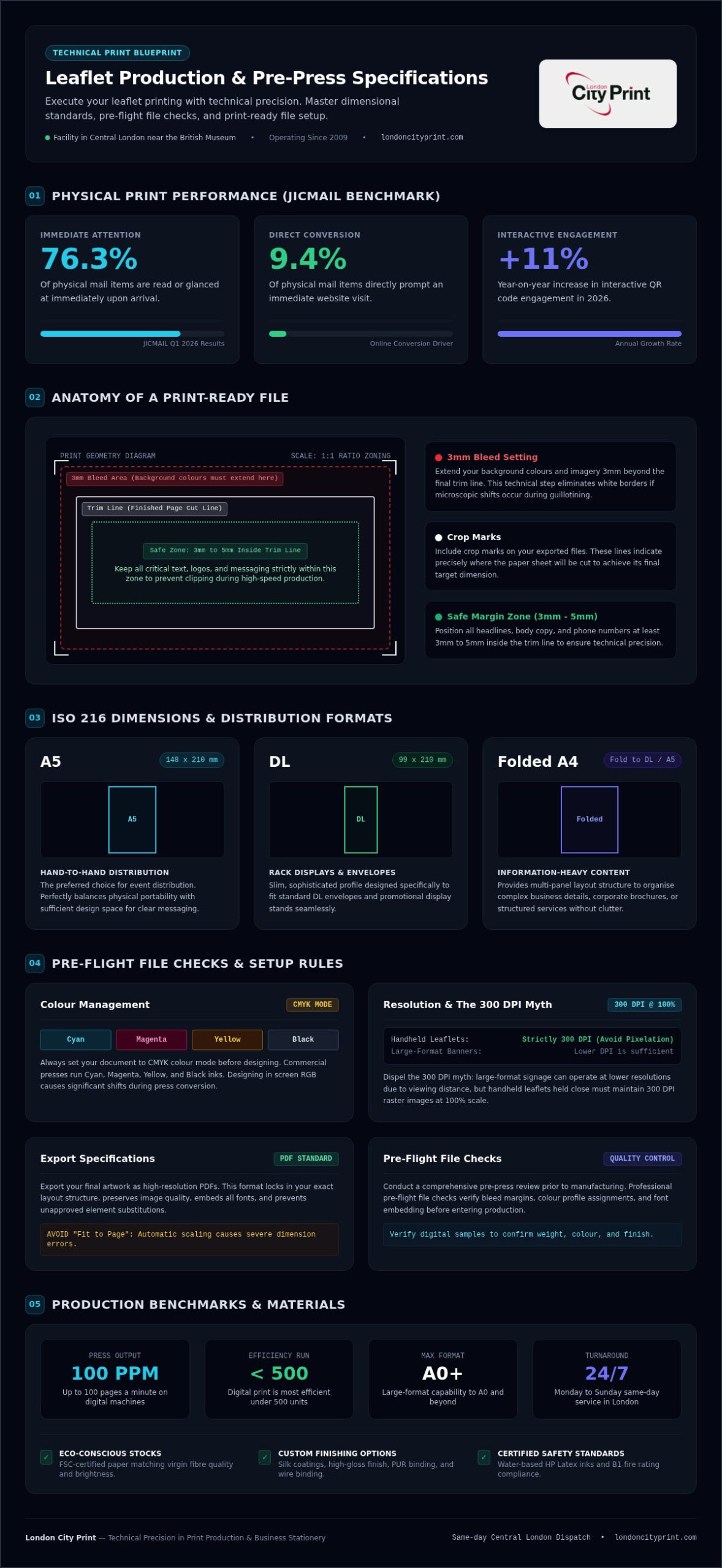
Selecting the correct ISO 216 size is vital for logistical success. A5 (148 x 210 mm) remains the preferred choice for hand-to-hand distribution because it balances portability with ample design space. For professional rack displays or envelope inserts, DL leaflets (99 x 210 mm) offer a slim, sophisticated profile that fits standard DL envelopes perfectly. If your project requires information-heavy content, such as a company brochure, an A4 sheet folded to DL or A5 provides the necessary structure to organize complex details. Regardless of the size you choose, you must account for print bleed and trim allowances during the initial setup. This technical step ensures your design extends to the very edge of the paper after guillotining, preventing unsightly white borders.
Messaging and Hierarchy
Your content must be structured for rapid information retrieval. Lead with a benefit-driven headline that addresses a specific reader pain point. Use concise, direct language to explain your value proposition. Avoid long blocks of text. Instead, use categorized groupings and bullet points to organize your offerings. This methodical approach ensures your message remains clear even during a quick glance. When you’re deciding how to print a leaflet, remember that the visual flow should lead the reader’s eye directly to your most important information.
Position your call to action (CTA) in a high-visibility area. Research from JICMAIL indicates that 9.4% of physical mail items prompt an immediate website visit. You can facilitate this by integrating scannable QR codes, which saw an 11% year-on-year increase in engagement in 2026. Ensure your contact details are legible and that the next step for the reader is unmistakable. Whether it’s a website URL, a phone number, or a physical address, your CTA should be the most accessible element on the page. Planning these elements before you move to production ensures your marketing collateral drives the intended results for your business.
Technical File Preparation: Creating Print-Ready Files
Producing a professional marketing tool requires more than creative design. It demands technical precision. If you want to understand how to print a leaflet that maintains your brand’s authority, you must master the pre-press process. High-quality physical collateral builds consumer trust in print advertising, but that credibility is lost if your files result in blurry images or misaligned text. Your goal is to deliver a file that the production team can process without friction.
Understanding Bleed and Crop Marks
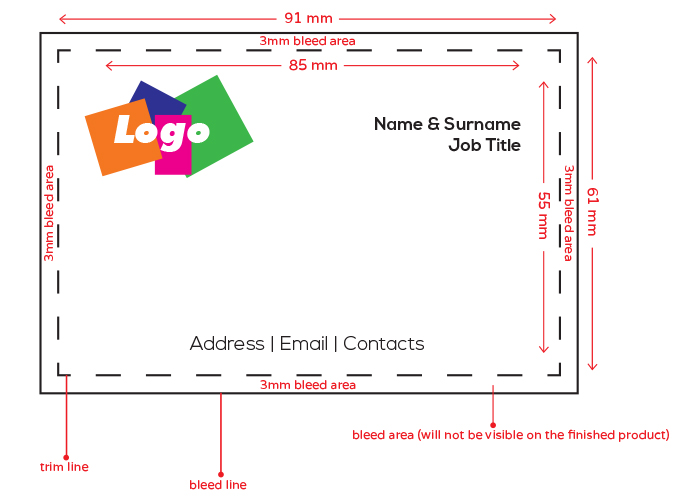
You must establish a 3mm bleed on all edges of your document. This area extends beyond the final trim line, ensuring that your background colours or images reach the very edge of the paper after it is cut. Without this, even a microscopic shift in the guillotine can leave an unprofessional white border. You should also include crop marks, which are the small lines indicating where the paper will be trimmed. To protect your messaging, keep all critical text and logos within a safe zone. This is a 3mm to 5mm margin inside the trim line that prevents essential information from being accidentally clipped during high-speed production.
Colour Management and Resolution
Always set your document to CMYK colour mode before you begin designing. While digital screens operate in RGB, commercial presses use Cyan, Magenta, Yellow, and Black. If you design in RGB, you will likely experience significant colour shifts when the file is converted for print. Similarly, you must address the 300 DPI myth. While large-format banners can often use lower resolutions, handheld leaflets require raster images to be exactly 300 dots per inch at 100% scale to avoid pixelation.
When your design is complete, export it as high-resolution PDFs. This format preserves your layout, image quality, and technical settings. Ensure you enable font embedding to prevent the printer’s software from substituting your typography with different fonts. If you are operating under a tight corporate deadline, using a professional file-checking service is the most reliable way to catch technical errors before they reach the press. These pre-flight file checks verify your resolution, bleed, and colour profiles, giving you the calm assurance that your final product will be error-free.
Selecting Professional Paper Stocks and Finishes
The physical quality of your marketing material communicates your brand’s standards before a single word is read. When you’re determining how to print a leaflet that feels substantial, the choice of paper stock is a critical variable. You must balance the tactile experience with the practicalities of distribution and durability. While technical settings ensure visual clarity, the substrate you select provides the physical foundation for your campaign. Selecting the right materials ensures your documents stand out in a competitive environment.
Paper Weights and Their Uses
GSM stands for grams per square metre. It measures the density and thickness of the paper. For high-volume marketing flyers, 130gsm to 170gsm is the industry standard. These weights offer a professional feel without being overly bulky for hand-to-hand distribution. If you require a more premium, card-like impression for a corporate event, 250gsm to 400gsm stocks are more appropriate. These heavier weights suggest quality and permanence. Many modern businesses now prioritize eco-conscious stocks. Using FSC-certified stock demonstrates a commitment to sustainable forest management, aligning your marketing with corporate social responsibility goals. These stocks match the brightness and quality of virgin fibre while supporting your environmental targets.
Functional and Aesthetic Finishes
Finishes alter the surface of the paper to achieve specific visual or functional effects. A high-gloss finish enhances colour saturation, making it ideal for leaflets featuring vibrant photography or product images. However, it can cause strong reflections under bright lights. For a more sophisticated, understated look, a matt finish provides a non-reflective surface that is easier to read. Silk offers a middle ground, providing a smooth texture with a subtle sheen that works well for information-dense layouts.
Lamination adds a protective plastic layer. This is essential for items that will be frequently handled, such as restaurant menus or instruction guides. For premium projects, you can use custom finishing options like spot UV. This process applies a glossy coating only to specific areas of the design, creating a striking contrast against a matt background. Following professional print-ready file preparation guidelines ensures that these advanced finishes are applied accurately during the production phase. When you’re deciding how to print a leaflet for a high-stakes corporate presentation, these finishes provide the final layer of technical precision that defines a successful project.
The Step-by-Step Process to Professional Production
Once your files are technically sound, the production phase begins. Understanding how to print a leaflet requires choosing the right technology for your specific run length. If you’re ordering a short run under 500 units, digital printing is the most efficient choice. It allows for rapid setup and immediate production. For high-volume corporate campaigns, lithographic printing becomes the more cost-effective method. While litho requires more initial preparation, it offers lower unit costs for large orders. Before the presses start, your provider should perform pre-flight file checks to verify that the resolution, bleed, and colour profiles meet commercial standards.
Pre-Press and Digital Sampling
Accuracy in the pre-press stage prevents costly waste. You should use digital samples to assess the actual colour reproduction and paper weight before committing to the full run. This physical or digital proof acts as a final safeguard for technical precision. One common issue to watch for is the fit to page setting. You should avoid this option in your print dialogue, as it often shrinks your document to fit a printer’s default margins, causing significant scale errors. By reviewing a sample, you ensure the final dimensions match your original design intent perfectly.
Printing and Finishing
Modern production environments operate with a sense of deadline-oriented urgency. High-speed digital presses can print up to 100 pages a minute, allowing for same day turnaround in Central London. After the ink is dry, the sheets move to finishing. Precision trimming is used to remove the bleed area and reach your final custom dimensions. This step ensures clean, professional edges that reflect your brand’s quality. It’s the difference between a DIY flyer and a corporate marketing tool.
If your project involves more than a single sheet, you might require specialized assembly. For multi-page leaflet booklets or corporate reports, wire binding provides a durable solution that allows the document to lay flat when open. This method is particularly effective for manuals or product brochures that recipients will reference frequently. To ensure your marketing materials are ready for your next event, you can submit your print-ready files now for a professional technical review. This step-by-step approach ensures that knowing how to print a leaflet results in a high-impact final product delivered exactly when you need it.
Why London City Print is Your Professional Partner
London City Print has operated as a Central London specialist since 2009. Situated near the British Museum, we act as a vital engine for corporate clients who require technical mastery under pressure. When you’re determining how to print a leaflet for a high-stakes event, you need a partner that understands the logistical demands of modern commerce. We don’t just provide print; we provide a dependable support system. Our facility is designed for rapid information retrieval and high-speed production, ensuring your brand maintains its professional decorum even when operating under the tightest constraints.
Urgent and Reliable London Service
Deadlines in the city don’t wait for standard business hours. We operate 24 hours a day, Monday to Sunday, to ensure your materials are ready when you are. This round-the-clock availability is essential for professionals facing tight schedules for trade shows, corporate conferences, or board meetings. We can deliver your documents directly to your event stand or office, removing the friction of local logistics. Our role in providing professional printing services London businesses trust is built on this unwavering reliability. Whether it’s an overnight production run or a same-day request, our high-speed digital presses maintain a brisk and purposeful pace to meet your specific goals.
Expertise in Commercial Reprographics
Our technical expertise extends beyond simple reproduction. We use water-based HP Latex inks and B1 fire-rated materials to ensure your marketing collateral meets the highest safety and quality standards. Our deep experience in producing complex Booklets and Brochures translates directly into better leaflets for your business. We apply the same level of methodical thoroughness to a single-page flyer as we do to a legal bundle or a bound presentation. This commitment to quality ensures that every piece of business stationery we produce reflects your company’s philosophy and image accurately.
You can rely on our expert file-checking service to catch errors before they reach the production floor. This pre-press review verifies that your designs are truly print-ready, protecting you from the risks of low-resolution images or incorrect colour profiles. By positioning ourselves as an indispensable professional partner, we help you master the steps of how to print a leaflet with total confidence. We take pride in being constantly available and highly responsive, acting as the silent but vital engine behind your most successful projects. Our facility is ready to bring your presentations to life with the precision your business deserves.
Achieve Technical Perfection in Your Next Campaign
Mastering the technical steps of how to print a leaflet ensures your brand projects authority and reliability. You’ve learned how to align your format with your distribution strategy and how to prepare error-free files using CMYK profiles and precise bleed settings. By selecting the right paper weights and custom finishing options, you can create a tactile experience that captures and holds consumer attention. These strategic choices turn simple paper into a powerful marketing engine for your business.
When high-stakes deadlines approach, you don’t have to navigate the production process alone. Our team provides expert pre-flight file checks to catch resolution errors before they reach the press. We offer a same-day service in Central London and remain open 24/7 from Monday to Sunday to support your business around the clock. You can trust our expertise to deliver results that meet the highest commercial standards. Start your professional leaflet project with London City Print today. Your marketing collateral is a vital tool for your success, and we’re ready to help you bring it to life with precision and speed.
Frequently Asked Questions
What is the best paper weight for a professional leaflet?
Standard marketing flyers typically use 130gsm to 170gsm paper stocks. If you require a premium, card-like feel for a corporate event, you should select 250gsm to 400gsm weights. Using FSC-certified paper ensures your materials align with environmental standards while maintaining high brightness. Choosing the correct weight is a vital part of the process when you’re learning how to print a leaflet that reflects your brand’s commitment to quality.
How do I set up a 3mm bleed for my leaflet design?
You set up a 3mm bleed by extending all background colours and images 3mm beyond the final trim edge of your document. This extra area provides a safety margin for the high-speed guillotine during the trimming process. Without it, even a microscopic shift can result in unsightly white borders. You must also include crop marks to indicate exactly where the sheet should be cut to reach its final custom dimensions.
Can I print a leaflet in less than 24 hours in London?
Yes, you can access same-day printing services in Central London at our facility near the British Museum. We operate 24 hours a day from Monday to Sunday to support high-stakes corporate deadlines. This round-the-clock availability ensures that urgent marketing collateral or business stationery is ready for your event or meeting. We can deliver directly to your stand or office to ensure your project stays on schedule.
What is the difference between digital and litho leaflet printing?
Digital printing is the most efficient method for short runs under 500 units because it requires minimal setup time. It’s the ideal choice for rapid turnaround and localized testing. Lithographic printing is better suited for high-volume orders where unit cost-effectiveness is the priority. While litho takes longer to prepare, it offers superior consistency for bulk runs. Both methods achieve the technical precision required for professional results.
Why do my printed colours look different from my computer screen?
This discrepancy usually happens because computer screens use the RGB colour model; while commercial presses use CMYK. Screens emit light to create colours, whereas print uses layers of ink that absorb light. To prevent unexpected colour shifts, you must set your design document to CMYK mode from the start. Following ISO 12647 standards and Fogra datasets ensures your final product matches your professional design intent accurately.
Do I need to include crop marks on my print file?
You must include crop marks on your print-ready files to ensure the production team knows exactly where to trim the paper. These small horizontal and vertical lines sit outside the bleed area and define the final size of your document. They are essential for technical precision, especially when your project involves custom dimensions. Without these marks, the risk of trimming errors increases significantly during the finishing stage.
What file format is best for professional leaflet printing?
High-resolution PDFs are the industry standard for professional reprographics. Using the PDF/X-4 format preserves your layout, technical settings, and live transparency. You must ensure that all images are 300 DPI at 100% scale and that you’ve enabled font embedding. This prevents the software from substituting your chosen typography. Mastering these file settings is a critical part of knowing how to print a leaflet that looks sharp and professional.
Can you help me check my files before they go to print?
Yes, we provide a professional file-checking service to verify your artwork before production begins. Our experts perform pre-flight file checks to catch common technical issues such as low-resolution images, incorrect colour profiles, or missing bleed. This review gives you the calm assurance that your files are technically sound. We act as your indispensable professional partner to ensure your final leaflets drive the results your business needs.