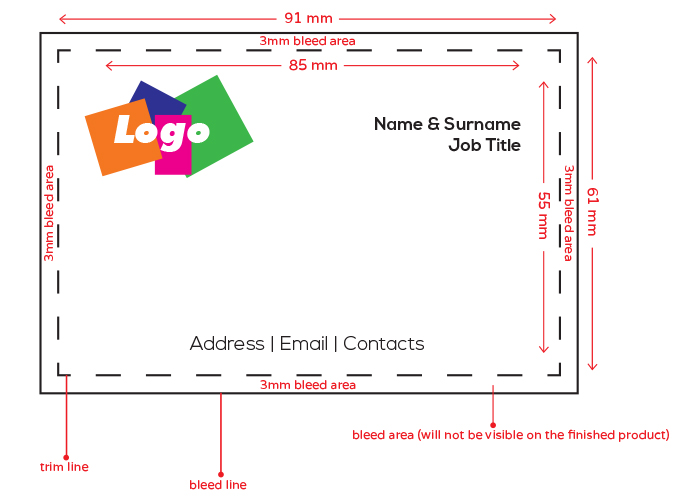


In a digital environment saturated with fleeting notifications, a physical information brochure remains the most authoritative way to secure a stakeholder’s undivided attention. You likely recognize the high stakes involved when preparing for a major corporate event in Central London. The pressure to deliver a flawless document often leads to confusion over technical details like paper weights, binding types, and correct bleed margins. It’s frustrating to manage these complex logistics while trying to maintain a clear message under a tight deadline.
This guide will help you master the art of structuring and printing professional brochures that command attention and deliver results. We’ll show you how to create a high-end tactile feel that builds trust and ensures your project stands out in a competitive market. By following these proven steps for design hierarchy and technical production, you can navigate the complexities of commercial printing with calm assurance. You’ll learn how to transform a simple document into an indispensable tool that meets the rigorous demands of modern commerce and achieves a rapid turnaround for your next critical project.
Key Takeaways
- Understand the psychological advantages of physical media and how it improves information retention for corporate audiences.
- Master the design principles required to structure an information brochure that guides readers through a logical, high-impact hierarchy.
- Select the most professional binding and format options, from sleek saddle-stitching to functional wire binding for technical documents.
- Learn to navigate critical technical specifications like bleed margins and CMYK colour profiles to ensure a flawless final print.
- Discover how to manage high-stakes deadlines for London-based projects through strategic local production and delivery.
What is an Information Brochure and Why Does It Still Matter?
An information brochure is a structured, multi-page document designed to educate, inform, or guide a specific audience through complex data. Unlike a simple advertisement, it provides a logical narrative that encourages deep engagement. When asking What is a brochure, it’s essential to view it as a curated experience rather than just a stack of paper. In professional Central London environments, these documents act as silent brand ambassadors. They represent your firm’s attention to detail long after a meeting concludes. Common applications include corporate annual reports, event programmes for high-stakes conferences, and technical guides for legal summaries.
The Strategic Advantage of Physical Information
Tactile media builds a level of trust that digital screens often fail to replicate, especially in B2B and technical sectors. Holding a physical information brochure creates a sensory connection that improves information retention. Research into haptic perception suggests that readers recall details more accurately when they can physically navigate through pages. Digital scrolling is often hurried and fragmented. In contrast, a printed booklet allows for a methodical review of the content. Within a professional sales funnel, a brochure serves as a permanent reference point. While a website tab is easily closed and forgotten, a high-quality printed document remains on a client’s desk. It provides a persistent reminder of your expertise and reliability.
Brochure vs. Flyer: Choosing the Right Format
The decision between a single-page flyer and a multi-page brochure depends on your depth of information requirements. A flyer is an excellent tool for rapid information retrieval, but it lacks the space for complex arguments. You should apply the depth of information test to your content before committing to a format. If your message requires technical diagrams, categorized lists, or a tiered hierarchy of details, a multi-page format is necessary.
Use a flyer for:
- Quick announcements or high-level event dates.
- Broad distribution at high-traffic London hubs.
- Simple calls to action with minimal technical data.
Choose an information brochure for:
- Complex service descriptions requiring detailed diagrams.
- Legal bundle printing or technical documentation.
- Scenarios where building authority through comprehensive detail is paramount.
Booklet formats, such as those utilizing wire binding or saddle-stitching, offer a superior cost-benefit ratio for high-volume information. They organize vast ranges of technical offerings without overwhelming the reader. This methodical approach ensures your client receives the full scope of your capabilities in a professional, organized manner; for example, you can discover Gold Buyers Sydney CBD to see how high-value service providers use these formats to build trust through transparency.
Structuring Your Content: The Information Hierarchy
Designing a successful information brochure requires more than just aesthetic appeal; it demands a deep understanding of how the human eye interacts with physical media. Readers typically engage with brochures using an “F-pattern.” They scan the top horizontal section, move down slightly for a second horizontal scan, and then skim the left side vertically. To respect this behavior, you must place your most vital value propositions in these high-traffic zones. This methodical placement ensures that even a casual skimmer absorbs your primary message.
A logical flow is the backbone of professional documentation. Your layout should move seamlessly from a high-level introduction to dense core information, concluding with actionable next steps. This progression prevents the reader from feeling lost in technical details. Structuring your brochure’s content effectively means anticipating the reader’s questions and answering them in the order they naturally arise. Each page should build upon the previous one, creating a cohesive narrative that guides the stakeholder toward a decision.
White space is a critical component of professional design. It prevents information fatigue by giving the reader’s eyes a place to rest. When pages are overcrowded, the perceived complexity of the information increases, which often leads to the document being discarded. Typography serves as a visual signal of importance. Use distinct font weights and sizes to guide the eye toward key takeaways and summary boxes. Clear hierarchy allows busy professionals to find the specific data they need without unnecessary friction.
Copywriting for Clarity
Complex technical data must be broken down into digestible sections to maintain engagement. Busy professionals often operate under intense time pressure and require rapid information retrieval. Use descriptive headings that summarize the content of the following paragraph. When writing for an information brochure, keep your sentences direct and functional. Your calls to action should feel like polite invitations to engage further, such as requesting a detailed technical specification or scheduling a site visit. If you need assistance with layout or formatting, our team at London City Print can help refine your document for maximum impact.
Visualizing Data and Information
Infographics and charts are indispensable for simplifying complex concepts. A well-designed chart can communicate a trend or a technical specification faster than several paragraphs of text. You must maintain a precise balance between imagery and text-heavy sections to ensure the document feels authoritative yet accessible. Always ensure your graphics are high-resolution, ideally 300 DPI, to avoid pixelation in the final print. Low-quality visuals undermine the sense of professional reliability you aim to project. High-stakes corporate environments demand precision, and your visual data must reflect that standard.
Choosing Formats and Bindings for Professional Impact
Selecting the physical dimensions of your document is a strategic decision that influences how your audience consumes data. A4 remains the industry standard for high-density reports and technical documentation, while A5 offers superior portability for Central London trade shows and networking events. Bespoke square formats provide a modern, high-end aesthetic that differentiates your brand from traditional competitors. Understanding how to create an effective brochure involves aligning these dimensions with your distribution method and the reader’s specific environment. A larger format suggests authority and depth, whereas a smaller, compact size encourages immediate reading and easy storage in a briefcase or laptop bag.
Paper weight and finish are the primary drivers of a document’s tactile quality. For a professional information brochure, we typically recommend a 130gsm to 170gsm silk stock for internal pages. Silk provides a sophisticated, low-glare surface that is ideal for reading long-form technical content without eye strain. Gloss finishes are better suited for image-heavy portfolios, such as those used by travel-focused brands like Tripaholics to bring vibrant photography to life, while uncoated paper offers a raw, tactile feel that allows for handwritten notes. Adding a 250gsm or 300gsm cover with a matt or soft-touch lamination significantly increases durability. These finishes protect the document from scuffing during transit and project a sense of unwavering professional reliability. Soft-touch lamination, in particular, provides a velvet-like texture that immediately signals premium quality to the recipient.
Wire Binding for Technical and Legal Documents
Wire binding is the industry gold standard for documents requiring frequent reference or hands-free use. It allows the pages to rotate 360 degrees and lay completely flat on a desk, which is essential for manuals, CAD plotting, and complex legal summaries. This method is exceptionally durable, ensuring that high-use guides remain intact through repeated handling. For corporate tenders and court bundles, the visible metal coil provides a clean, organized aesthetic that suggests technical mastery and methodical thoroughness. It’s a robust solution for documents that exceed the page limits of standard stapling.
Saddle-Stitched Booklets for Marketing
Saddle-stitching is a highly cost-effective solution for high-volume distribution of an information brochure. By using staples along the spine, this method produces a magazine-style feel that’s both professional and approachable. It’s the ideal choice for corporate brochures between 8 and 48 pages. When planning a saddle-stitched document, remember that your total page count must be a multiple of four to accommodate the folded sheet structure. This format remains a staple for Central London businesses that need to deliver high-impact messaging with a rapid turnaround and a polished, streamlined finish.
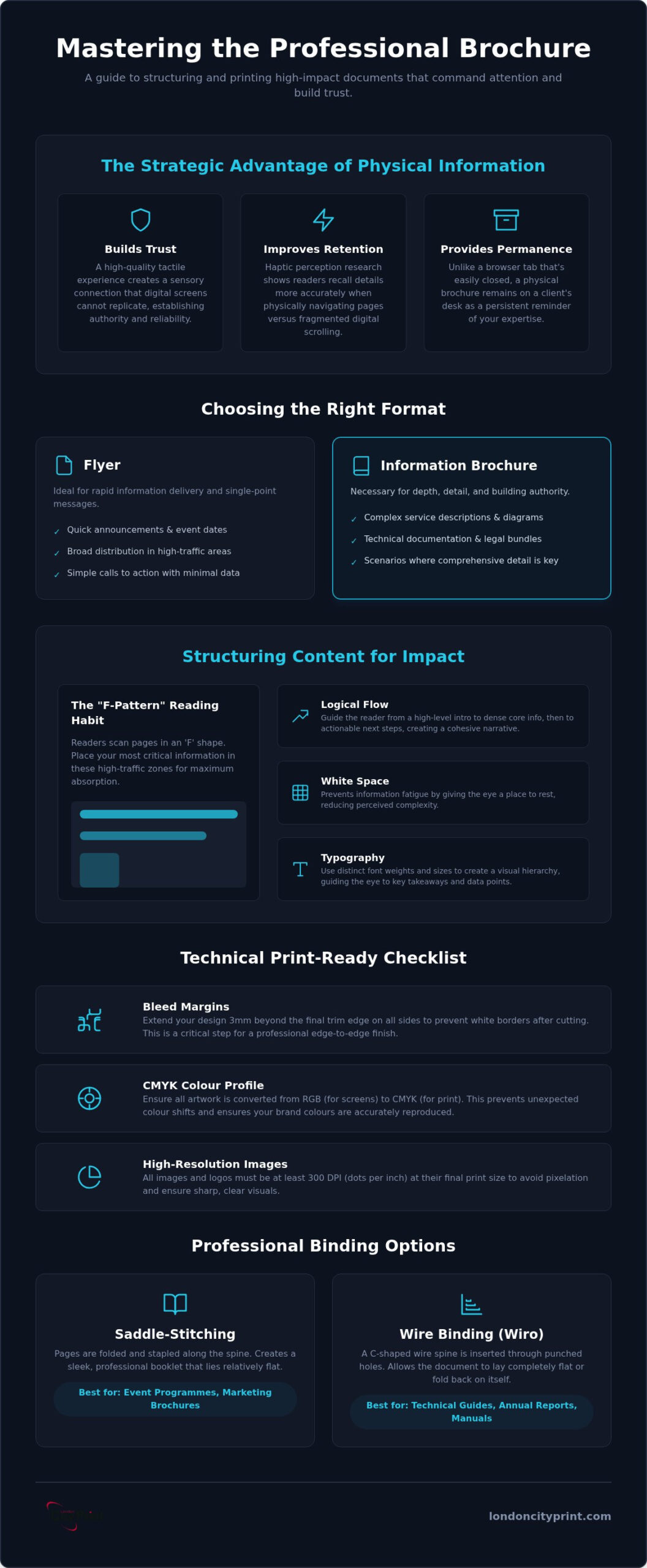
Technical Preparation: Making Your Brochure Print-Ready
Preparing a file for professional production is a high-stakes task where technical precision directly impacts your project timeline. For a corporate information brochure being produced in Central London, there is no margin for error. Incorrect file setup often leads to costly reprints or missed event deadlines. Understanding the difference between screen display and physical manufacturing is the first step in ensuring your document meets the standard of an indispensable professional partner. Our methodical approach to file preparation ensures that your document moves through our Central London facility with maximum efficiency.
Bleed and quiet zones are essential for accommodating the physical cutting process. A 3mm bleed is the industry standard; it extends your background elements beyond the trim line to prevent white borders if the blade shifts slightly. Simultaneously, your quiet zone should be at least 5mm from the trim edge. This internal margin ensures that vital text or logos aren’t positioned too close to the cut, which projects a methodical, organized feel. Digital screens use RGB light, but commercial presses use CMYK ink. Converting your files before submission prevents unexpected colour shifts that can dull your brand’s visual impact. High-stakes corporate documentation requires precise colour matching, especially for logos and brand-specific palettes.
Understanding Bleed and Margins
Setting up bleed in Adobe InDesign is straightforward; you simply input 3mm into the bleed section of the document setup. In Canva, you must select ‘Show Print Bleed’ from the file menu and ensure your background elements stretch to the outer edge. This small technical detail is the difference between a polished finish and a document that looks amateurish. For a comprehensive walkthrough of industry standards and how to apply them correctly across different software, our professional guide to bleed for print covers everything you need to know to avoid rejected files and unprofessional white borders. Proper internal margins are equally vital. They prevent text from being obscured by the binding, particularly in thicker wire-bound documents where the holes consume a portion of the inner margin.
Resolution and Image Quality
A 300 DPI resolution is non-negotiable for a professional information brochure. Web-optimised images are typically 72 DPI, which appears crisp on a smartphone but pixelated and blurry once printed. Use vector graphics for logos and icons whenever possible. Unlike raster images, vectors can be scaled to any size without losing clarity, which is vital for maintaining a sharp, authoritative look. When exporting your final PDF, use the ‘High Quality Print’ or ‘PDF/X-1a’ preset. Ensure that ‘Crop Marks’ and ‘Use Document Bleed Settings’ are both selected. This creates a print-ready file that our technicians can immediately impose for rapid production. If you’re operating under a tight deadline and need technical guidance, you can submit your files to London City Print for a professional pre-flight check.
Professional Brochure Printing in Central London
Local production is the final, critical link in the professional supply chain. When you’re managing a high-priority project in the City, the geographical proximity of your production partner becomes a strategic advantage. It eliminates the logistical risks associated with national couriers and long-distance shipping. London City Print operates as a silent engine behind your most important presentations, providing the calm assurance required when deadlines are non-negotiable. Every information brochure we produce undergoes a methodical quality check to ensure it meets our standards of precision and professional decorum.
Meeting High-Stakes Corporate Deadlines
Corporate environments operate with a sense of purposeful urgency. We recognize that tenders, board reports, and event programmes often require a rapid turnaround that standard printers cannot accommodate. Our Central London facility is specifically organized to handle high-stakes requirements with technical mastery. Whether you need a small run of bespoke booklets or large-scale technical documentation, we maintain a brisk communication rhythm to keep your project on track. This responsiveness is vital for professionals who need to pivot quickly based on shifting project requirements. For projects where every hour matters, our same day booklet printing London service provides the technical precision and rapid turnaround your most critical deadlines demand.
We offer flexible logistics to suit the fast-paced nature of modern commerce:
- Direct collection from our Central London hub for immediate needs.
- Swift courier delivery across the City of London and major business districts.
- Methodical handling of complex legal bundle printing and CAD plotting.
- Rapid production schedules designed to facilitate same-day requirements.
The London City Print Difference
Since 2009, we’ve positioned ourselves as an authoritative expert in commercial production. Our technical expertise extends beyond simple printing into complex finishing solutions like wire binding and large format displays. We don’t just act as a service provider; we serve as an indispensable professional partner who understands the nuances of corporate documentation. This personalized approach ensures that your information brochure isn’t just another print job, but a high-trust tool that reflects your brand’s commitment to quality and precision.
Our team is exceptionally accommodating and technically skilled, assisting with final file checks to prevent errors like incorrect bleed or low-resolution imagery. We take pride in being a dependable support system for clients operating under pressure. If you’re ready to move from design to physical production, you can Get a professional quote for your information brochure today. We’re here to ensure your next Central London project is delivered with unwavering professional reliability and the methodical thoroughness your stakeholders expect.
Deliver Your Message with Professional Precision
Transitioning from a digital design to a physical document requires a methodical approach to hierarchy and technical specifications. You’ve learned how to structure content for maximum retention and how to prepare files that avoid common print errors like incorrect bleed or colour shifts. A well-executed information brochure is more than just a handout; it’s a high-trust tool that represents your brand’s authority in high-stakes environments. When you prioritize clarity and tactile quality, your documentation becomes an indispensable asset for your stakeholders.
London City Print provides the technical expertise and rapid turnaround necessary for your most critical projects. Our Central London location ensures swift delivery for urgent tenders and events. Our range of premium finishes, including wire binding and soft-touch lamination, adds a high-end tactile feel to every page. We act as your indispensable partner, providing expert support to ensure your files are print-ready and your results are flawless. Order your professional brochures from London City Print today and experience the calm assurance of a partner committed to your success.
Frequently Asked Questions
What is the best paper weight for an information brochure?
We recommend a weight between 130gsm and 170gsm silk or gloss paper for the internal pages of an information brochure. This range provides a professional, high-quality feel that remains easy to navigate. For the most authoritative impact, pair these internal pages with a heavier 250gsm or 300gsm cover to increase durability and project a sense of quality.
How many pages should an information brochure be?
The ideal page count depends on your specific information hierarchy and the binding method you select. Saddle-stitched booklets require a page count in multiples of four to accommodate the folded sheet structure. Wire-bound documents offer more flexibility and can accommodate any number of pages, making them a superior choice for dense technical manuals or legal summaries.
Can I get same-day brochure printing in London?
Our Central London facility is specifically organized to provide rapid turnaround for urgent corporate deadlines, which often includes same-day production. Availability depends on current capacity and the complexity of your finishing requirements. We recommend submitting your print-ready files as early as possible to ensure your project is prioritized for immediate processing and delivery. For a full technical breakdown of how to prepare your files and manage logistics for urgent jobs, our guide to same day booklet printing in London covers every critical step for a flawless result.
What is the difference between wire binding and saddle stitching?
Saddle stitching uses staples along the spine for a streamlined, magazine-style finish, while wire binding uses a metal coil that allows the document to lay completely flat. Saddle stitching is a cost-effective solution for documents up to 48 pages. Wire binding is the industry standard for high-use manuals and technical guides that require frequent hands-free referencing.
Do I need to include bleed on my brochure design?
You must include a 3mm bleed on all sides of your design to ensure a flawless finish after trimming. This technical requirement prevents white borders from appearing if the cutting blade shifts slightly during production. It’s also vital to maintain a 5mm quiet zone for all text and essential graphics to prevent them from being positioned too close to the trim edge. For a detailed explanation of how to set up your files correctly, our complete guide to bleed for print provides step-by-step technical guidance for all major design applications.
What file format should I use for professional printing?
High-quality, print-ready PDFs are the required format for professional brochure production. We recommend exporting your files using the PDF/X-1a preset with all fonts embedded and images set to a resolution of 300 DPI. Ensure your document is set to the CMYK colour profile to avoid unexpected shifts between your digital design and the physical information brochure.
Can you help with the layout of my technical brochure?
We offer expert technical support to ensure your files are perfectly optimized for our production equipment. While our primary focus is commercial manufacturing and finishing, our team provides essential pre-flight checks to identify and correct technical issues before printing. This methodical support helps you avoid common errors like incorrect margins or low-resolution imagery.
Do you offer delivery for brochures in Central London?
We provide direct courier delivery across the City of London and major business districts from our Central London hub. Our location is strategically positioned to facilitate rapid distribution for stakeholders operating under tight deadlines. Clients who require the fastest possible turnaround can also choose to collect their finished documents directly from our facility.