
Selecting high quality booklet printers means matching print resolution, paper stock capacity, and automated double-sided capabilities to the volume you actually run. Market research on booklet-capable hardware places entry-level to mid-range devices in a 99–500 $ band (market median $200 from analysis of 12 top listings); that band is a market sample, not a single-vendor price list. Your core decision is practical: keep short digital jobs under your own control when volume stays low, or move complex binding and heavy stocks onto a production floor when jams, colour drift, or missed creasing would cost you the deadline. London City Print wrote this guide to help you make that call with clear technical criteria.
Key Takeaways: High quality booklet printers require automatic duplexing and 3 mm bleed support to ensure professional alignment that standard home setups cannot mechanically replicate.
- Hardware for booklet production typically requires a mid-range investment between 99 and 500 dollars.
- Use desktop printers for internal drafts, as home devices lack the pressure for crisp folds.
- Outsource runs exceeding 500 units to digital production systems to avoid high ink costs.
- The article’s case for 170gsm to 250gsm stock ensures wine lists turn cleanly without jamming.
Segment Guide: Match Equipment to Your Volume
If you pick hardware by brochure alone, you pay for it in failed feeds and rushed reprints. Match the device tier to the jobs on your calendar this month, then lock stock and binding to that tier.
Typical situations we route every week:
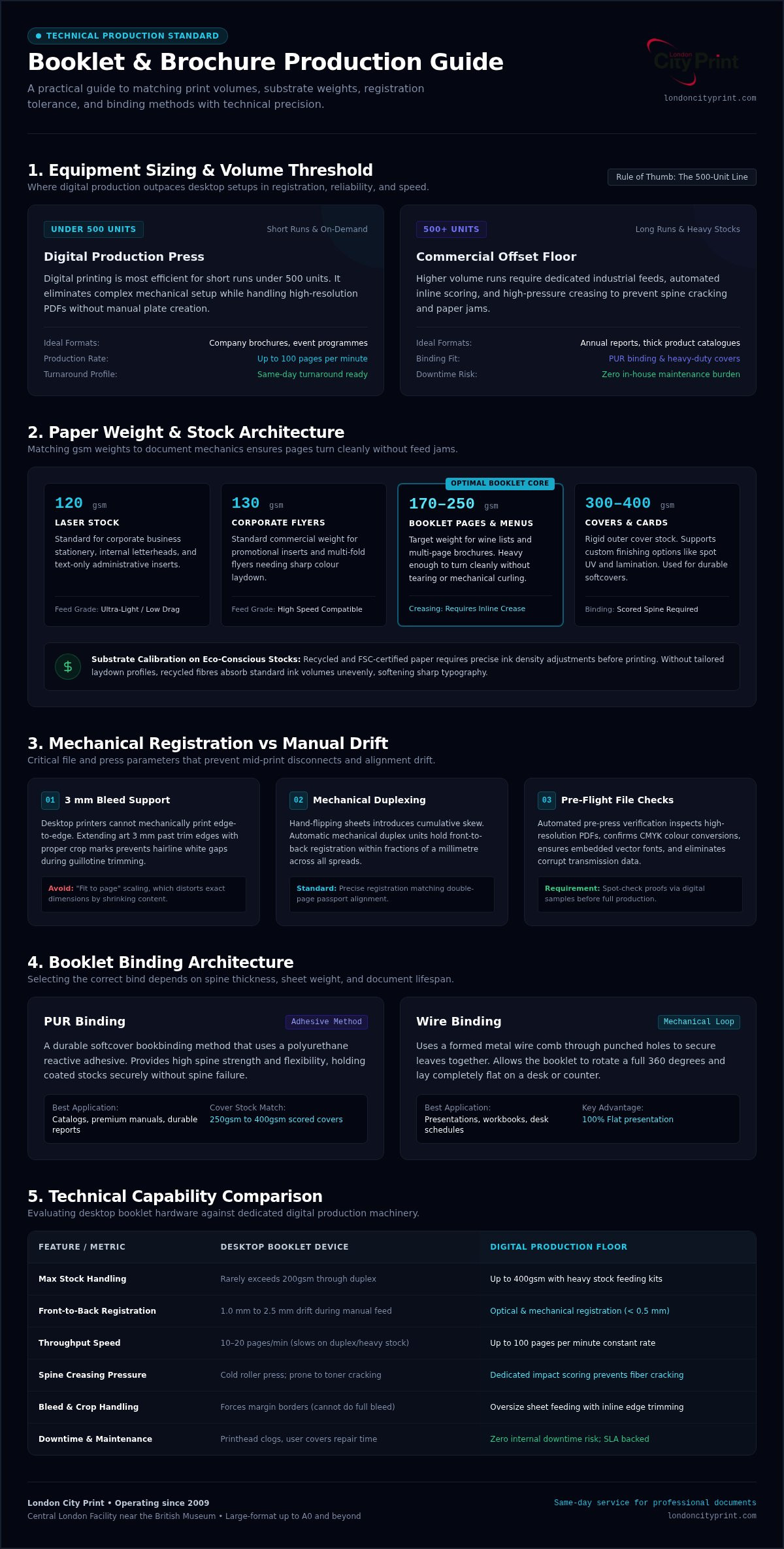
- Short brochure runs under 500 units: stay on digital printing so setup time and unit cost stay proportionate to the job.
- Multi-page wine lists or similar menus: print inner pages on 170gsm to 250gsm stock so pages turn cleanly and still feed reliably.
- Higher volume with durable covers: plan heavy-duty offset capacity and PUR binding (a durable softcover adhesive method); keep wire binding for shorter projects.
Wrong-tier choices show up as incomplete curing, lost air release, incorrect dimensions, and mid-print disconnections. A configuration sized to your volume avoids those failures and keeps delivery dates intact. For fast corporate collateral that needs exact technical precision on 120gsm laser or 130gsm stocks, use corporate flyer printing rather than forcing a light device past its duty cycle.
Industrial ink laydown still depends on substrate calibration so sheets do not distort under impression. Get that calibration wrong and you chase dimension errors for the rest of the shift.
A commenter in the printplanet.com thread "Forum list":
"Online editor component for print shops in 2026, any real use cases left?" (source)
Web editors still earn their place: they catch dimension errors early by enforcing pre-flight file checks, embedded fonts, and correct bleed settings before files reach the press. That automation cuts mid-print disconnections caused by corrupt transfers.
Tip: Evaluate your weekly volume before committing to hardware; low-tier devices often cost more in total ink over time.
Do These Printers Support Automatic Duplex Printing?
Professional pamphlet printers (booklet printers) support automatic duplex printing so double-sided work does not depend on hand flipping. In daily production work, manual double-sided feeding introduced alignment drift on booklet jobs; moving those jobs onto mechanical duplexing removed the flip step and restored precise front-to-back registration on high-resolution PDFs, with crop marks and bleed margins held in place automatically.
Treat registration like a double-page passport: shift one side by a millimetre and the whole booklet loses technical precision. Digital printing stays efficient for short runs under 500 units and processes detailed graphics without manual intervention. Our digital production machines print at up to 100 pages a minute. When the turnaround is tight, use same-day printing so brochures leave the floor on schedule.
Evaluate Output Quality and Resolution Specs
Missed bleed, weak resolution, or uncured ink does not stay a “pre-press issue”: it lands on your event table, your client’s desk, or your brand launch. High quality pamphlet printers (professional equivalent: booklet printers) exist to stop those failures before they reach the trimmer.
In production we repeatedly see the same chain: files arrive without proper crop marks or CMYK conversion, trim accuracy drops, and the timeline slips while corrections run. Low-resolution images produce fuzzy text and blurred artwork; uncured UV ink leaves wet surfaces that smear across finished booklets. If you need a clear read on how rush providers differ from full production on finish and turnaround, use this quality and speed comparison.
Selecting recycled paper (professional equivalent: eco-conscious stocks) needs adjusted ink density so edges stay sharp. Skip that adjustment and you trade a greener sheet for soft type.
A commenter in the printplanet.com thread "Forum list":
"Why is UV ink not fully cured in flexo printing?" (source)
UV ink remains uncured when lamp intensity drops or when ink layers are applied too thick for light penetration. Check lamp output and film weight before you blame the stock.
Calculate 2-Year Total Ownership and Maintenance
A purchase price only starts the spreadsheet. Ink, maintenance, and replacement parts decide whether an in-house booklet path stays cheaper than outsourcing over two years.
On the floor, in-house machines fail mid-crisis through sudden printhead clogging or feed errors. When that happens on a complex job, you absorb downtime you cannot recover before the deadline. Plenty of light-duty setups also mishandle last-minute changes, which leaves you exposed exactly when the document has to ship. Outsourcing to professional pamphlet printers removes those repair bills from your side of the ledger.
For short runs, buying dedicated binding equipment is rarely the stronger financial move: digital production scales without locking capital into idle metal. When you need heavy presentation pieces, specify 600gsm card on a same-day service and keep the overhead off your books. Request a personalized quote when you want deadline-backed production without owning the hardware. More on this: 600gsm card on a same.
Verify Paper Handling and Stock Compatibility
Stock weight is a machine setting problem before it is a design preference. Choose weights your trays and rollers can actually move, or you invent jams on the busiest day of the run.
From client work on the London production floor, incorrect weights are a routine cause of preventable jams in heavy runs. Heavier media behaves like stiff cardstock inside feed rollers and needs precise tray adjustments. For multi-page wine lists or booklets, print inner pages on 170gsm to 250gsm stock. For corporate letterheads, 100gsm covers 85% of jobs and still feeds cleanly through standard office devices. On eco-conscious stocks (recycled paper), confirm machine tolerance first so feed rates stay stable.
Tip: Match internal page stock to application requirements, such as 170gsm to 250gsm for wine lists or 100gsm for letterheads, to avoid feeding jams.
Among Google reviews for London City Print, a long-term client (5?) wrote:
"London City Print have been our local printers for years and they never disappoint. They always offer various options to choose from with sustainability in mind. Fast, tailored and quality service every time. Thanks Tony and the team"
Flexible, eco-conscious paper choices are what keep that kind of multi-year working relationship intact.
Compare Desktop vs Commercial Booklet Systems
Desktop units earn their place on internal drafts; commercial pamphlet printers earn theirs when volume, fold quality, and edge cleanliness are non-negotiable. In the daily production workflow, desktop devices jam on dense weights because they lack the mechanical pressure heavy stocks need for crisp folds.
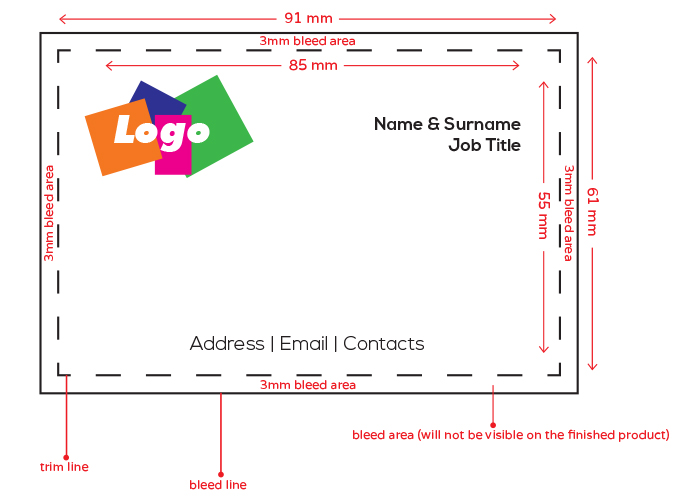
A 3 mm bleed (the extra artwork extending beyond the trim line) is another dividing line: commercial equipment holds that bleed so trimmed edges stay free of white slivers. Desktop paths struggle here once covers get thick.
| System Type | Output Speed | Best For |
|---|---|---|
| Desktop Printer | Low Volume | Quick internal drafts |
| Commercial System | High Volume | Professional booklets |
Use desktop machines for small internal notes. Move corporate brochures onto production systems when fold accuracy and speed have to arrive together. Submit your files when you want a personalised figure for a commercial run.
Setup Workflow in 5 Steps for Accurate Creasing
A pre-press file-checking service stops brochure jobs on pamphlet printers from turning into last-hour emergencies. Technicians see the same failure pattern when fold lines sit in the wrong place: heavy cover stock cracks along the spine and the job is lost. Accurate creasing is the corrective action that protects thick covers before they hit the folder.
- Check artwork bleed: Add a 3 mm bleed and keep vital text inside the safety margin.
- Set CMYK profiles: Convert all RGB colors to CMYK to prevent colour shifts during production.
- Calibrate crease channels: Use proper setup tools so folds stay clean on the chosen weight.
- Run digital samples: Print a physical proof to verify paper weight and fold alignment.
- Inspect spine alignment: Confirm crop marks align across all pages.
Work the five steps in order and you catch registration and crack risks on the proof, not on the finished pile. Contact the production desk when you want that checklist applied to your next file set.
Assess Environmental Impact and Security Standards
You need pamphlet printers that keep confidential artwork controlled and still run responsible materials. Professional facilities print on FSC-certified stock with water-based HP Latex inks to cut emissions while holding colour fidelity.
Client work shows commercial floors can keep swift turnarounds and still enforce compliance from pre-press file checks through final delivery. Eco-conscious stocks (professional equivalent: recycled paper) limit waste when they are matched to virgin-fibre performance targets rather than forced through an unsuitable device. If you are concerned about data leaks on a fast job, encrypted handling keeps artwork protected in transit through the workflow.
Ask for a personalised production plan when you need those controls written into the job ticket.
For eCommerce businesses looking to scale, aligning professional print production with a logistics partner like Silicon Valley Direct ensures that high-quality booklets and collateral are integrated seamlessly into the order fulfillment process.
Honest Limits: When In-House Printing Fails
Standard office equipment cannot deliver complex binding, exact colour reproduction, or heavy cardstocks to a commercial standard. Desktop printers jam on thick stock and rarely offer true edge-to-edge printing without leftover margins.
Shop-floor observation is consistent on this point: forcing saddle-stitching on light machines damages internal rollers and throws layout alignment out. Commercial equipment holds technical precision across each fold, applies correct creep adjustment, and keeps crop marks accurate so text stays sharp.
Office gear also lacks automatic file-checking service features, so missing bleed areas become white gaps after trim. Keep desktop setups for basic internal drafts. Move external presentations to commercial production when the document represents your brand outside the building.
Contact London City Print when you need reliable same-day document production near your deadline.
Frequently asked questions
Can These Printers Handle Different Paper Sizes for Booklet Printing?
High quality booklet printers (professionally known as pamphlet printers) accommodate sheet sizes from compact menus to oversized corporate brochures. Inner pages for multi-page wine lists or booklets typically run on 170gsm to 250gsm stock, while 100gsm is used for 85% of corporate letterheads to limit jams. Crop marks and bleed settings are checked before production so custom-dimension documents trim on target.
This technical versatility is essential for services like Festival City Photography, where the range of printed output spans from individual student portraits to multi-page yearbooks that require precise alignment and durable binding.
What Is the Average Ink Cost per Booklet Printed?
Professional production cost tracks page count, coverage, and binding choices such as PUR binding (a durable softcover method using polyurethane adhesive). Equipment purchase values sit in the market band described at the top of this guide, yet ink still varies with your CMYK coverage. Ask directly for a quote built around your run size and ink profile.
Are These Printers Compatible With Mac and Windows Operating Systems?
Modern digital production units connect to both Mac and Windows through standard PDF workflows. Supply high-resolution PDFs with embedded fonts so cross-platform output stays consistent. The file-checking service verifies pre-flight checks on both platforms before a job reaches the presses.
Do These Printers Support Automatic Duplex Printing?
Professional pamphlet printers run double-sided sheets automatically so section alignment stays consistent. Digital printing stays efficient for short runs under 500 units when schedules are tight. Request a physical digital sample proof if you want to inspect layout before the full run.
How Long Is the Typical Warranty Period for These Printers?
Commercial machinery warranty coverage depends on the service agreement and manufacturer terms. Operating since 2009, London City Print keeps strict equipment maintenance protocols for high-stakes projects. Reach the Central London facility near the British Museum when you need fast local production on an urgent timeline.
Printing Precision in 2026
The choice you opened with still stands: size high quality booklet printers to your real volume and stock needs, and step up to commercial production when desktop limits put the deadline at risk. Digital workflows keep short-run work fast when the file arrives clean.
The team at London City Print handles complex finishes from the facility near the British Museum and verifies artwork before presses start. Send a file-checking query when you want a quote on the next job, and review booklets and brochures for London business use cases.